Difference between revisions of "Template:Temperature Monitoring Physical Setup"
| Line 10: | Line 10: | ||
File:Temperature_Monitoring_-_Physical_Setup_-_Black_body_mount.jpg|Black body bracket installation | File:Temperature_Monitoring_-_Physical_Setup_-_Black_body_mount.jpg|Black body bracket installation | ||
File:Temperature_Monitoring_-_Physical_Setup_-_camera_mount.jpg|Thermal camera bracket installation | File:Temperature_Monitoring_-_Physical_Setup_-_camera_mount.jpg|Thermal camera bracket installation | ||
| + | </gallery> | ||
| + | |||
| + | To attach the tripod: | ||
| + | |||
| + | <gallery> | ||
| + | File:Temperature_Monitoring_-_Physical_Setup_-_Tripod_1.jpg|Use the center hole to screw into tripod | ||
| + | File:Temperature_Monitoring_-_Physical_Setup_-_Tripod_2.jpg|Tripod installed | ||
</gallery> | </gallery> | ||
1. | 1. | ||
Revision as of 21:11, 1 April 2020
Video Instructions
Step by Step Instructions
Mounting Adapter Plates
The mounting brackets/plates must be installed to both the camera and black body device

RQW026-00 Brackets
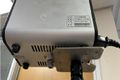
Black body bracket installation
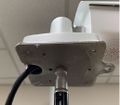
Thermal camera bracket installation


To attach the tripod:
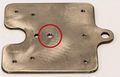
Use the center hole to screw into tripod

Tripod installed


1.

